Think about your morning routine. You check your phone, send emails, browse social media, and maybe stream music. Each action involves computer software working behind the scenes.
But what exactly is computer software? And why should you care about the different types?
Whether you’re running a business, working from home, or simply curious about technology, understanding software types helps you make better choices. This guide breaks down everything you need to know in simple terms.
What Is Computer Software?
Computer software is a set of instructions, data, or programs that tell a computer what to do. Think of it as the brain that controls your computer’s body. It tells the hardware (the physical parts) exactly what to do and when to do it.
On its own, computer hardware is just silent machinery. It can’t think, decide, or create. Software is what gives it purpose, it tells the hardware what to do, when to do it, and how. From opening a browser to running complex business tools, software is the invisible force that makes technology useful in everyday life.
How Software Has Changed
Modern software development has transformed dramatically. Development teams now use agile methods to build better programmes. This means they create software in small steps, test it quickly, and improve it based on what users actually need. This shift towards agile development practices enables faster iterations and better adaptation to changing user needs.
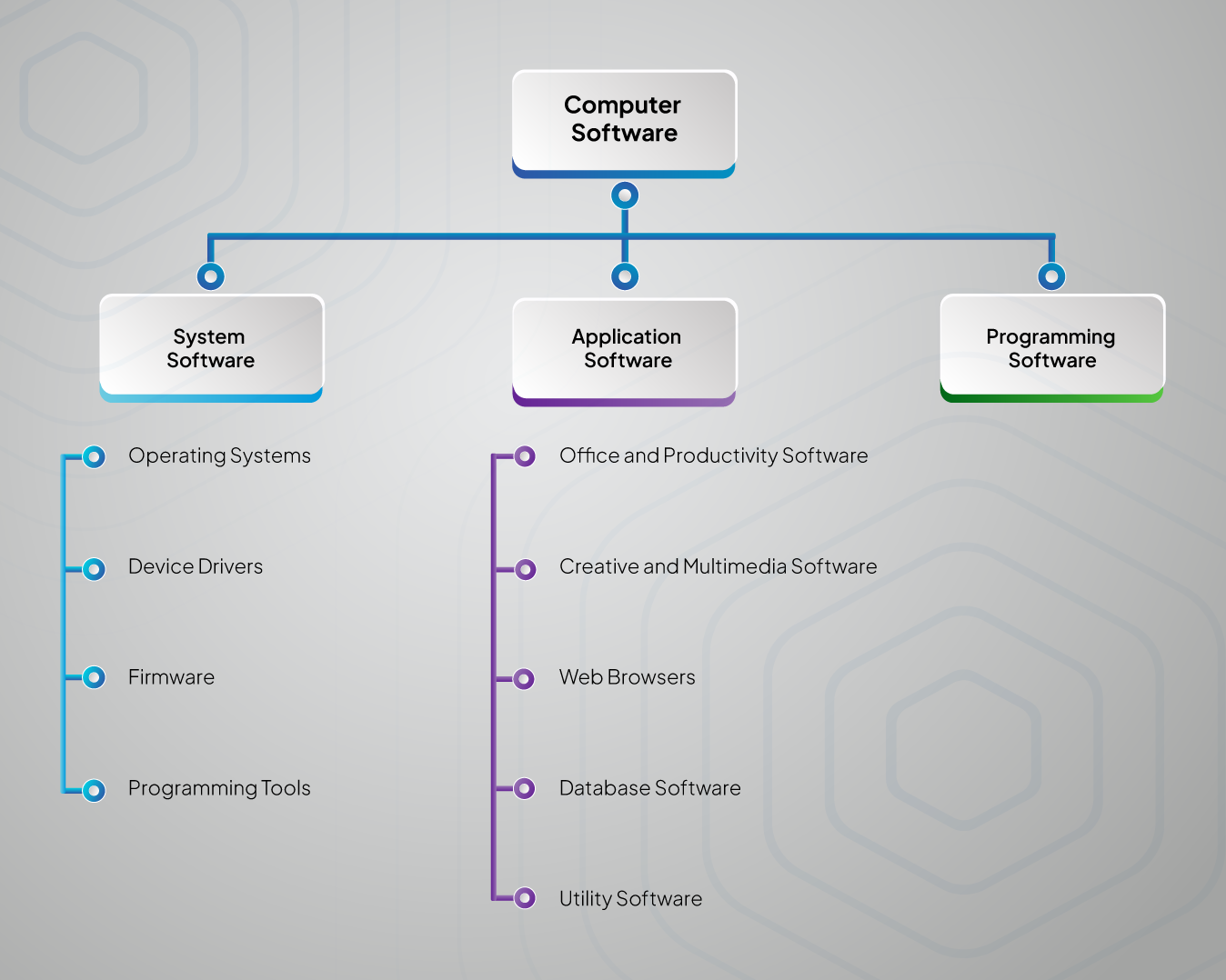
The Three Main Types of Computer Software
Let’s break down software into three simple categories. Each type has a different job to do.
System Software: The Foundation
System software is like the operating backbone of your computer, it keeps everything running smoothly in the background. Just as your nervous system controls and coordinates your body’s functions without you thinking about it, system software manages all the core tasks that let your computer work. It handles communication between hardware and applications, manages resources like memory and processing power, and ensures that all your devices—keyboard, screen, printer, and more—talk to each other correctly. Without it, your computer’s hardware would just sit there, unable to do anything useful.
1.Operating Systems
Your operating system is like a conductor leading an orchestra. It coordinates all the different parts of your computer so they work together smoothly.
Windows, macOS, and Linux are the most common operating systems. Each one has a different personality:
-
- Windows is popular in offices and gaming
- macOS is preferred by creative professionals
- Linux is loved by tech enthusiasts and developers
2.Device Drivers
These are like translators between your operating system and your hardware.
Every piece of equipment connected to your computer needs a driver. Your printer, camera, keyboard, and mouse all rely on drivers to communicate properly.
When something stops working after an update, it’s often a driver issue.
3.Firmware
Firmware lives permanently inside your hardware components. It’s the first software that runs when you switch on a device.
Think of firmware as the basic instincts built into your hardware. It knows how to perform essential functions even before the main operating system loads.
Programming Tools
These are the tools that software developers use to create all the other programmes you use.
Just like carpenters need hammers and saws, programmers need special tools to write, test, and fix code.
Application Software: What You Actually Use
Application software is what most people think of when they hear the word “software”. These are the programmes you interact with directly.
1.Office and Productivity Software
Word processors, spreadsheets, and presentation tools fall into this group. Microsoft Office and Google Workspace are perfect examples.
These tools help you create documents, analyse data, and share ideas. They’ve replaced typewriters, calculators, and filing cabinets for most businesses.
2.Creative and Multimedia Software
Photo editors, video players, music apps, and design tools belong here.
Whether you’re editing holiday photos or creating professional marketing materials, multimedia software gives you creative power that was once only available to specialists.
If your business needs a custom mobile app for creative or multimedia purposes, professional mobile app development services can bring your vision to life across iOS and Android platforms.
3.Web Browsers
Chrome, Firefox, Safari, and Edge are your gateways to the internet.
Browsers do much more than just display websites. They handle security, manage passwords, sync data across devices, and run complex web applications.
4.Database Software
These programmes store and organise massive amounts of information.
From customer lists to inventory tracking, database software helps businesses keep everything organised and searchable.
5.Utility Software
These are your computer’s maintenance crew. Anti-virus programmes, file cleaners, and backup tools keep everything running smoothly.
Many utility programmes work quietly in the background, protecting your system from threats and optimising performance.
The Cost of Data Preparation for AI: The Biggest Surprise?
Programming software helps developers create all the other types of software we use.
These tools have become incredibly sophisticated. Modern development environments can predict what programmers want to type, spot mistakes instantly, and even suggest improvements.
This sophistication means better software gets built faster, which benefits everyone.
Other Ways to Classify Software
How Software Is Shared
Free and Open Source Software
Some software is completely free to use and modify. Linux, Firefox, and LibreOffice are famous examples.
Open source communities often create surprisingly good software. Many of the internet’s core technologies started as open source projects.
Commercial Software
Companies like Microsoft, Adobe, and Apple sell licences to use their software.
Commercial software usually comes with professional support, regular updates, and polished user interfaces. You pay for convenience and reliability.
Free and Trial Software
Many modern applications offer basic features for free but charge for advanced functionality.
This approach lets you try before you buy. You can test whether the software meets your needs without financial risk.
How Software Is Delivered
Cloud-Based Software
Software as a Service (SaaS) runs on remote servers instead of your computer.
Gmail, Netflix, and Zoom are all cloud-based. You access them through your web browser or a simple app that connects to their servers.
Cloud software has several advantages:
-
- Automatic updates
- Access from anywhere
- No installation hassles
- Usually includes backup and security
For businesses looking to leverage cloud technology effectively, web development services can help create custom web-based solutions that work seamlessly across all devices.
Installed Software
Traditional software gets installed directly onto your computer or company servers.
This approach gives you complete control but requires more maintenance. You’re responsible for updates, backups, and security.
Building Software That Grows With Your Business
Creating good software isn’t just about writing code. It requires careful planning and smart architecture.
The Development Process
Most software projects follow similar steps:
-
- Understanding what users actually need
- Planning the technical approach
- Building the software in stages
- Testing everything thoroughly
- Launching and gathering feedback
- Continuously improving
Scalability Matters
The best software grows with your needs. Scalable software solutions handle more users, data, and complexity without breaking down.
Many successful businesses start with simple software solutions and expand them over time. This approach is much smarter than trying to build everything at once. Learning to scale from MVP to full product can save enormous time and money.
Agile Development Benefits
Modern software development uses agile methods that focus on:
-
- Regular user feedback
- Flexible planning
- Quick adaptation to changes
- Continuous improvement
This approach produces software that actually solves real problems rather than theoretical ones.
How Software Impacts Business
Boosting Efficiency
Good software eliminates tedious manual work. It reduces mistakes, speeds up processes, and frees your team to focus on more valuable activities.
Competitive Advantages
The right software can give you significant advantages over competitors. Custom solutions can address your specific needs in ways that generic software cannot.
Better Decision Making
Modern software collects and analyses data automatically. This information helps you understand your customers, track performance, and spot opportunities.
For businesses seeking to leverage data effectively, digital transformation services can help integrate various software solutions to create comprehensive business intelligence systems.
Managing Costs
While software requires upfront investment, it typically pays for itself through improved efficiency and reduced labour costs.
Choosing the Right Software
What to Consider
Before selecting any software, think about:
-
- What problems you’re trying to solve
- How many people will use it
- Whether it needs to connect with other systems
- Your budget for both purchase and ongoing costs
- How much training your team will need
Implementation Tips
Successful software adoption requires:
-
- Clear communication about changes
- Proper training for all users
- Gradual rollout rather than sudden switches
- Ongoing support and troubleshooting
When implementing new software systems, professional IT consulting services can ensure smooth transitions and help avoid common pitfalls that disrupt business operations.
Planning for the Future
Choose software that can grow with your business. Consider how your needs might change and whether the software can adapt accordingly.
If you’re struggling to find existing software that meets your unique requirements, custom software development might be the answer. Personalised solutions can provide exactly the functionality you need whilst integrating seamlessly with your existing systems.
Current Software Trends
Artificial Intelligence Integration
Artificial Intelligence or AI is becoming part of everyday software. From email spam filtering to photo organisation, AI features make software smarter and more helpful.
Easier Development
New tools allow people to create software without traditional programming skills. These “low-code” platforms are democratising software creation.
Edge Computing
Processing data closer to where it’s collected improves speed and reduces costs. This trend affects how software is designed and deployed.
Security and Software
Staying Protected
Software security is more important than ever. Regular updates, strong passwords, and careful permission management are essential.
Meeting Regulations
Many industries have strict requirements for software security and data handling. Healthcare, finance, and government sectors have particularly demanding standards.
Protecting Privacy
Good software protects user privacy by design. This means collecting only necessary data and storing it securely.
What’s Next for Software?
Software continues evolving rapidly. New technologies and approaches emerge constantly..
The most successful businesses stay informed about these changes and adapt when beneficial. However, they don’t chase every new trend blindly.
Focus on software that solves real problems for your business and customers. The fanciest technology means nothing if it doesn’t deliver practical value.
Making Smart Software Choices
Understanding computer software types helps you make better decisions. Whether you’re choosing tools for personal use or business operations, you now have the knowledge to evaluate options effectively.
Remember these key points:
-
- System software manages your computer’s basic functions
- Application software serves your direct needs
- Programming software creates other software
- Consider scalability and security in all choices
- Focus on solving real problems, not following trends
The right software can transform how you work and what you can achieve. Take time to understand your needs, research options thoroughly, and don’t hesitate to ask for expert help.
Frequently Asked Questions About Computer Software
What’s the difference between system software and application software?
System software controls your computer’s core functions — like the operating system and drivers — and provides the foundation for everything else. Application software, on the other hand, is what you use every day, such as Word processors, games, or browsers, to complete specific tasks.
How do I know if computer software is safe to download?
Only download computer software from official websites or trusted app stores. Look at user reviews, check the publisher, and always keep antivirus protection active. Avoid unknown sites or apps that request unnecessary permissions.
Why is updating computer software important?
Updating your computer software ensures security patches, bug fixes, and compatibility with newer hardware or applications. Without updates, your system becomes vulnerable to cyber threats, may run slower, and you’ll miss out on important new features.
What is cloud-based software and why is it so popular?
Cloud-based computer software runs on remote servers instead of your device. You access it through your browser, making it flexible and cost-efficient. Businesses and individuals prefer it because it requires no installation, updates automatically, and works from anywhere with an internet connection.
When should I choose custom software development?
Custom computer software is ideal when off-the-shelf solutions can’t meet your unique business requirements. It allows you to build features designed for your specific workflows, giving you a competitive edge. While it requires more investment upfront, it saves costs in the long run through efficiency and scalability.
Ready to find software solutions that perfectly fit your business needs? The team at Emvigo specialises in creating scalable, user-friendly software personalised to specific requirements. Contact us today to discuss how the right software can drive your business forward.
Great software isn’t about complexity or cost. It’s about finding the perfect match between your needs and available solutions.