
Telegram bots have exploded in popularity over the last few years—powering everything from customer support automation and eCommerce workflows to custom notifications, appointment scheduling, and even fully interactive mini apps.
Whether you’re a beginner trying to understand how to create a Telegram bot, a business owner exploring automation, or a developer curious about integrations, this guide will walk you through everything you need to get started—without confusion, jargon, or complicated technical hurdles.
Emvigo specialises in customised bot development for Telegram and AI chatbots, delivering secure, scalable integrations, conversational design, CRM/payment integrations, and dedicated engineering support and long-term maintenance for B2B growth.
In this detailed guide, you’ll learn how to make a Telegram bot from scratch, how Telegram bot APIs work, how to set up commands, how to write your first bot in Python or Node.js, and how to deploy it online so it runs 24/7. By the end, you’ll have a fully functional bot plus the confidence to build more advanced features when you’re ready.2
Let’s dive in.
What Is a Telegram Bot? (And Why They’re So Popular)
A Telegram bot is an automated program that interacts with users using text, buttons, commands, and API integrations. Think of it as your digital assistant inside Telegram—capable of answering questions, running tasks, retrieving information, or automating business workflows.
Common examples of Telegram bots
-
- Customer support chatbot
- eCommerce order-tracking bot
- Quiz or learning assistant
- Appointment booking bot
- Notification or alert bot
- Fitness reminders or habit trackers
- Internal employee communication bot
- Telegram Mini Apps with interactive UI
Why businesses love Telegram bots
-
- Available 24/7
- Cost-effective automation
- Works for both B2B and B2C
- Secure, fast, and cloud-driven
- No need to install additional apps
- Perfect for startups looking to scale workflows
Telegram has one of the most powerful bot APIs among messaging platforms which makes it ideal for businesses, developers, and teams looking for a dependable automation solution.
Understanding How Telegram Bots Work
Before you learn how to create a Telegram bot, you need to know the simple logic behind how bots function:
Telegram Bot API
This is the interface that allows your bot to send messages, receive user inputs, manage files, process commands, and more.
Polling vs Webhooks
-
- Long Polling
Your server repeatedly asks Telegram, “Any new messages?”
Good for beginners & local testing. - Webhooks
Telegram sends updates directly to your server whenever something happens.
Best for production.
- Long Polling
Server or Hosting
To keep your bot running 24/7, you’ll eventually need hosting—Heroku, AWS, Vercel, DigitalOcean, etc.
Programming Language
You can write bots in Python, Node.js, PHP, or almost any language. Once you understand the basics, creating a Telegram bot becomes surprisingly simple.
Prerequisites: What You Need Before Creating a Telegram Bot
You don’t need much to get started—just the basics:
-
- Telegram app
- A Telegram account
- BotFather (to generate your API token)
- Any programming language (Python recommended for beginners)
- A code editor like VS Code
- Optional: hosting (for later deployment)
If you’re exploring ways to enhance customer engagement using Telegram bots, understanding the broader impact of AI automation is essential. Our blog on the benefits of AI-powered chatbots in customer support shows how intelligent automation can transform your user experience—an approach we integrate into every Telegram bot we build at Emvigo Technologies.
With these ready, you’re set to begin.
How to Build a Telegram Bot: Step-by-Step Beginner Guide
This is how to create a Telegram bot tutorial. Follow these exact steps, and then you’ll have your bot running today.
Step 1:Create a New Bot Using BotFather
BotFather is the official Telegram tool used to create and manage all bots.
How to create a Telegram bot using BotFather
-
- Open Telegram
- Search for @BotFather
- Click Start
- Type /newbot
- Enter a name (anything you want)
- Enter a username (must end in bot. Example: myfirstassistantbot)
- BotFather will generate your API token.
An API token for a Telegram bot is a unique key created by BotFather when you set up a new bot. This token functions like a secure password that allows your application to communicate with Telegram’s servers.
With the token, developers can send messages, receive updates, set commands, and connect the bot with other systems. The API token is essential because it serves as your bot’s main security credential. If someone accesses it, they can control your bot completely. That’s why it must be stored safely and never shared publicly.
This API token is very important because it links your script with Telegram’s server..
DO NOT share your token publicly
If you accidentally leak your token, regenerate it using /revoke.
Step 2: Set Basic Bot Commands
This section explains how to set basic bot commands in Telegram using BotFather. These commands help users interact with your bot easily without guessing what to type. Common examples include:
-
- /start – Sends a welcome message
- /help – Shows all available commands
- /info – Provides bot details
Examples:
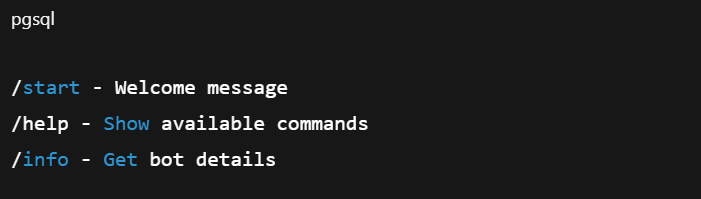
To set these up:
-
- Go to BotFather → /setcommands
- Select your bot
- Add commands in the format
To set these commands, go to BotFather → /setcommands and select your bot. Then add your commands in the required format. Once added, your bot becomes more professional, user-friendly, and easier for users to navigate.
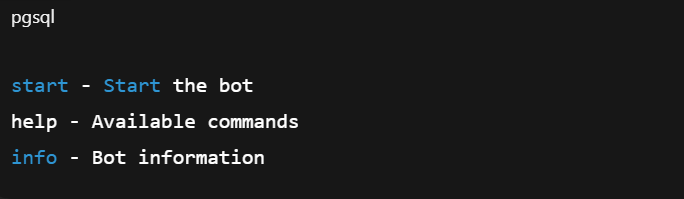
Now your bot looks professional and user-friendly.
Step 3: Choose Your Programming Language
| Language | Best For | Pros |
|---|---|---|
| Python | Beginners | Easy, popular, great libraries |
| Node.js | Scalable apps | Fast, asynchronous, flexible |
| PHP | Simple scripts | Easy web integration |
In this guide, we’ll show examples in Python and Node.js.
Step 4: Write Your First Telegram Bot Script
Python Example (using python-telegram-bot)
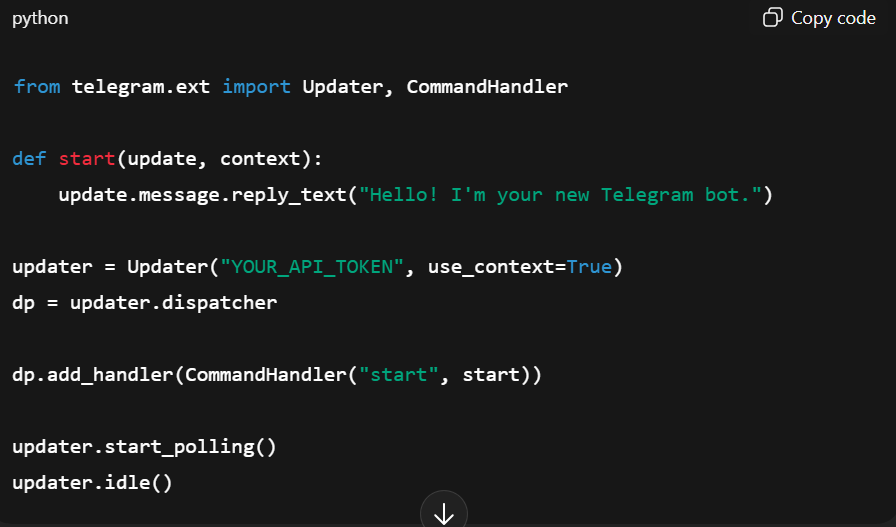
What this script does:
This Python script is a basic example of how to create and run a Telegram bot using the python-telegram-bot library. It imports key functions and defines a simple /start command. The script uses the API token to connect the bot to Telegram’s servers. When a user sends /start, the bot replies with a welcome message.
-
- It connects to the Telegram API using your token.
- It listens for /start.
- It responds with a welcome message.
The script uses polling to check for new messages and respond in real time. This setup is often used by developers to test bot functions, automate replies, and create interactive Telegram experiences for customer support, notifications, or workflow management.
Node.js Example (using node-telegram-bot-api)
This Node.js script demonstrates how to create a basic Telegram bot using the node-telegram-bot-api package. It begins by importing the library and creating a bot with your API token. Polling is enabled so the bot can continuously check for new messages. The bot.onText() function listens for the /start command, and when someone sends it, the bot replies with a welcome message.
This example helps you quickly set up a simple Telegram bot that can respond to users.
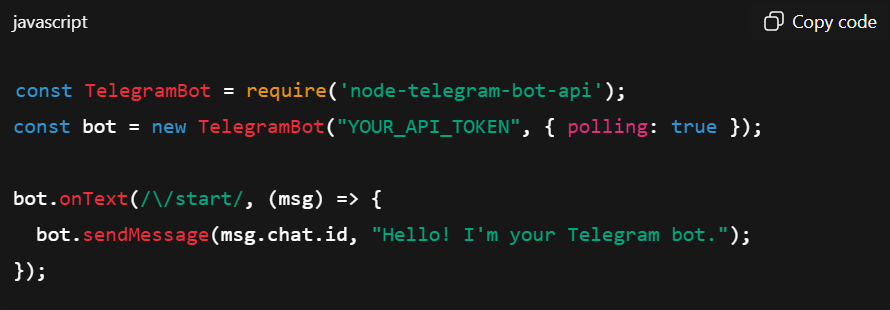
Install packages using:

In both versions, your bot now works locally.
Step 5: Connect Your Bot to Telegram
To run your bot locally:
Python

Node.js

Open Telegram → send /start → your bot responds instantly.
Step 6: Deploy Your Telegram Bot (24/7 Hosting)
If you close your laptop, your bot goes offline. To keep it active, you must deploy it on a server.
Popular hosting options:
-
- Heroku (best for beginners)
- Render (free tier available)
- Vercel
- AWS EC2
- DigitalOcean
Deployment steps differ by platform, but follow this pattern:
-
- Upload project to GitHub
- Connect Hosting platform
- Configure environment variables (API token)
- Deploy
- Confirm your bot is running
Step 7—Set Up Webhooks (For Production Use)
This step shows how to set up a webhook for your Telegram bot. A webhook sends updates directly to your server, making the bot faster and more reliable for production use.
You just need to call the URL shown, replace your API token and HTTPS server link, and Telegram will start sending messages to that address automatically.
Set a webhook:

Step 8—Test & Troubleshoot Common Errors
The bot doesn’t respond
-
- Check if bot is running
- Ensure API token is correct
“Webhook error”
-
- Ensure HTTPS is valid
- Use a trusted hosting provider
Commands not working
-
- Reconfigure using BotFather
- Reconfigure using BotFather
API request timeout
-
- Your server may be too slow
- Increase timeout settings
Advanced Features to Level Up Your Telegram Bot
Once the basics work, you can add powerful functionality:
Custom keyboards and inline buttons
Enable dynamic navigation and rich UI.
Working with media
Send images, documents, videos, and audio.
API integrations
Weather API, CRM system, databases, and calendars.
Database storage
-
- MongoDB
- Firebase
- PostgreSQL
Telegram Mini Apps
Create full-screen, app-like interfaces inside Telegram.
AI & NLP integration
Add ChatGPT, sentiment analysis, or FAQ automation.
The possibilities are endless.
Real-World Telegram Bot Use Cases
1. Customer Support Bot
Automate FAQs, track tickets, and reduce human workload.
2. eCommerce or Order Tracking Bot
Send shipping updates, product recommendations, or order status.
3. Appointment Booking Bot
Doctors, consultants, and salons—perfect for scheduling.
4. Learning & Education Bot
Quizzes, daily lessons, and reminders.
5. Lead Generation Bot
Capture user responses automatically.
6. Team Productivity Bot
Task reminders, standup updates, and status reports.
These workflows can save businesses hundreds of hours every month.
How Much Does It Cost to Build a Telegram Bot?Cost depends on complexity, integrations, and automation level.
| Bot Type | Cost Range |
| Simple basic bot | $100–$500 |
| API-integrated bot | $500–$1500 |
| Advanced bot with multi-flows | $1500–$3000 |
| AI-powered bot | $3000–$10,000+ |
How Emvigo Helps You Build High-Performance Telegram Bots
Building a Telegram bot is easy.
Building a secure, scalable, business-ready Telegram automation system is not.
That’s where Emvigo comes in.
At Emvigo, we don’t just create bots, we design automation ecosystems that help businesses streamline operations, improve customer engagement, and unlock new revenue opportunities inside Telegram.
What We Build
We specialise in delivering complete telegram bot solutions that go far beyond simple chat interactions
Custom Telegram Bots for Any Use Case
From simple FAQ and customer-support bots to multi-step conversational systems connected to your CRM, ERP, or internal tools—we build bots for your exact workflows and business goals.
Advanced Telegram Mini Apps
If you need a more interactive, app-like experience inside Telegram, our team designs full-featured Mini Apps with rich UI, server-side logic, payments, dashboards, and authentication flows.
API-Integrated Business Automations
We help you connect your bot with:
-
- CRM systems (HubSpot, Salesforce, Zoho)
- e-Commerce stores (Shopify, WooCommerce)
- Internal dashboards
- Third-party tools (payment gateways, support systems, logistics APIs)
This turns your Telegram bot into an operational command center.
AI-Driven Conversational Experiences
If your project needs intelligence, we integrate the latest NLP/AI models to enable:
-
- Auto responses
- Intelligent routing
- Smart suggestions
- Customer intent understanding
- Lead qualification
- ChatGPT-powered conversation flows
Secure, Cloud-Ready Deployment
Our engineers handle everything from development to cloud hosting and 24/7 uptime, using platforms such as AWS, DigitalOcean, Vercel, and Render.
We also take care of:
-
- Webhook configuration
- Database setup
- Performance optimization
- Load balancing
- Security hardening
From Simple Ideas to Enterprise Systems, We Build It All
Whether you’re looking to launch a simple customer support bot, build a lead generation funnel, or create a fully automated business workflow inside Telegram, our team has the expertise to design, develop, deploy, and maintain the system end-to-end.
We don’t just deliver bots; we deliver long-term automation assets for your business.
Want a free consultation? Let’s build your Telegram automation system together.